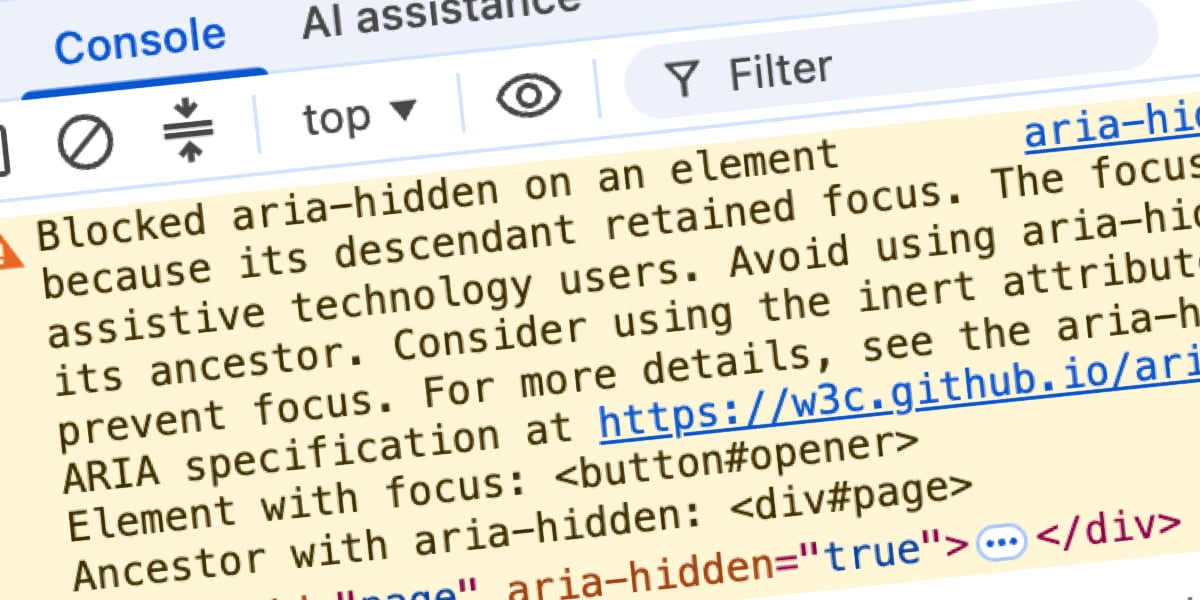
You closed a dialog and the console went that particular shade of angry mustard. You highlighted the message, dropped it into a search box, and it spat you out here along with half the front-end internet, because this exact string turns up identically whether you’re on Angular, Bootstrap, Ionic, or phpMyAdmin.
Here’s the part the top results bury: the warning is correct. There’s a real person on the other side of it — someone using a screen reader whose focus is about to drop into a hole in your page.
And the fixes ranking above those results all do the same thing under different names: the blur() one-liner, the setTimeout you wrap the close in, the trick where you yank the aria-hidden attribute off.
Each one quiets the console while quietly hurting the person the browser was trying to protect. If you’ve already shipped one of them, you’re in enormous company. You were failed by your search results, not careless.
One honest shortcut before you read another word: if you can migrate to the native <dialog> element and call .showModal(), do that, close this tab, and get your afternoon back, because the browser runs the entire focus dance for you and this class of bug all but disappears. (You’ll still want to handle the case where the element focus should return to has been removed from the DOM, which no browser can guess for you.) Everything past here is for the rest of us, wired into a component library or a design system we can’t tear out this quarter.
The Fix, If You’re in a Hurry
The whole thing fits in one sentence, and if it’s the only sentence you read you’ll still be ahead of most of what ranks above it: focus has to leave a region before that region becomes hidden or inert. That’s it. Everything else here is footnotes, edge cases, and the story of how to learn it without shipping the bug.
In practice it’s an order of operations. Most modal code already has the right pieces, just in the wrong sequence — the fix is purely a reordering, and the two versions below show it directly, with the one step nearly everyone skips (inert-ing the closing overlay itself) called out in the comments.
// WRONG: the order most modal code ships with
function closeModal() {
  // background hidden while focus is STILL inside it → ghost focus
  overlay.setAttribute('aria-hidden', 'true');
  overlay.classList.add('fade-out');
  overlay.addEventListener('transitionend', () => overlay.remove());
  // focus restored after the hide already committed; too late
  triggerButton.focus();
}

// RIGHT: hand the page back, then focus leaves, then the region goes inert
function closeModal() {
  // un-inert FIRST: inert blocks focus, so the trigger can't receive focus while the background is still inert
  background.removeAttribute('inert');
  // move focus OUT before anything gets hidden
  triggerButton.focus();
  // inert, not aria-hidden, on the CLOSING shell
  overlay.setAttribute('inert', '');
  overlay.style.pointerEvents = 'none';
  overlay.classList.add('fade-out');
  overlay.addEventListener('transitionend', () => overlay.remove());
}
The wrong version isn’t wrong because someone was careless. It reads top-to-bottom exactly the way you’d narrate closing a modal out loud.
But the browser applies that hide the moment the statement runs, before the focus move on the next line even happens. It’s all one synchronous task. The damage is in the ordering and the invalid state that exists between those two statements, not a literal gap in time.
Get the order right and the result is boring — which is exactly the point. The user hits Esc, hears focus land back on the button they opened the thing with, and carries on.
Get it wrong and they land on <body>, hear silence or just the page title, and have to Tab from the top of a long page all the way back to wherever they’d been. That second experience is what the warning exists to prevent, and it’s the one blur() hands the user every time.
Chrome Isn’t Warning You. It’s Overruling You.
You read the word “warning” and filed it where you file the rest of the console: yellow, non-blocking, someone else’s problem, deal with it after the release.
That word is doing a lot of damage, because it tells you this is advisory — and it isn’t. By the time you see the message, the browser has looked at your markup, decided you were wrong, and shipped a different accessibility tree than the one you wrote.
Open the modal that triggers it and look at the Elements panel. Your aria-hidden="true" is right there on the background wrapper, untouched. Nothing in the DOM inspector is a lie.
Now switch to the Accessibility panel and look at the tree Chrome actually handed the operating system’s screen-reader APIs. The subtree you told it to hide is still there, still exposed, still fully readable.

Blink read your attribute, saw the focused node living inside that subtree, and walked back up the focused node’s ancestor chain, ignoring your aria-hidden the whole way. The moment focus leaves, the pruning snaps back and the region hides like you asked.
So the state you think you shipped — the one where that region is invisible to assistive tech — is not the state any screen reader receives. It exists only in your Elements panel and your head.
That gap between the two panels is the whole bug, and it comes from a paradox baked into aria-hidden.
The attribute pulls content out of the accessibility tree. It does not pull that content out of keyboard focus order. Two different systems, nothing keeping them in sync.
So an element can be fully focusable and completely imperceptible at once. The instant Tab lands on it, you’ve created what can be called ghost focus: the screen reader fires a focus event for a node it’s been told doesn’t exist, looks it up, finds nothing it’s allowed to describe, and says nothing.
Consider what that’s like from the other side of the screen. Someone pressed Tab. Focus moved, a control lit up, and their screen reader went silent. Not “button, dialog.” Not the field label. Silence.
They pressed a key, the machine acknowledged nothing, and now they don’t know if the app broke, if their assistive tech crashed, or if they did something wrong. They’re standing in the middle of a room the map insists isn’t there, and the only way out is to keep tabbing blind and hope something eventually speaks.
That’s what Chrome prevents when it overrules you. Left alone, aria-hidden over a focused control doesn’t hide anything kindly; it hides the labels and keeps the focus, which is the worst of both.
How the Warning Evolved
Chromium has been quietly patching this for far longer than the warning has been visible in consoles. The tree became loud in two installments, reconstructed from when bug reports clustered rather than from a single changelog.
The open-time variant — the one that scolds you about an element that “just received focus” — shows up across trackers around Chrome 127 in summer 2024, clustering in July and August across MUI #43106, Ant Design #50170, and Flowbite #943.
The close-time variant, with the “retained focus” wording, arrives months later around Chrome 131 in late 2024. The person who filed Bootstrap #41005 on November 5 caught it live, noting it appeared in the 131 Beta and Nightly builds but not stable yet, and Angular #30187 in December matches. Two waves, one behavior underneath.
That behavior is old. Chromium was already exposing focusable aria-hidden nodes back in early 2020. ARIA WG issue #1185 records Chrome accessibility engineer Aaron Leventhal proposing exactly that, so users could “at least hear where they are tabbing to, instead of complete silence.”
The pattern he was defending against goes back further, to teams applying aria-hidden to <body> or a giant wrapper when a modal opened. Through portal and markup mistakes, this sometimes hid the modal too, locking a screen reader out of the whole page. You can watch people argue about that failure as far back as Bootstrap #29769 in 2019.
The honest framing: teardown code was broken years before any of this reached the console. The repair was happening silently the whole time, which is exactly why nobody fixed it. Firefox and Safari don’t surface a comparable console warning for this — but the underlying accessibility problem exists regardless of which browser surfaces it, and fixing the focus order correctly resolves it across all of them.