Why traditional loading patterns like spinners fail in agentic AI experiences, and how interface patterns that reveal the system’s process, status, and decision-making can improve transparency and build user trust.
In the first part of this series, we talked about the Decision Node Audit — mapping out the internal workings of an AI system to pinpoint the exact moments it makes decisions based on probabilities. This told us when the system needs to be transparent with the user. Now, the big question is how to share that information.
You’ve got your Transparency Matrix ready. You know which behind-the-scenes API calls need a visible status update. Your engineers are on board with the technical aspects. The next step is designing the visual container for those updates.
We face a legacy problem. For thirty years, interface designers have relied on a single pattern to handle latency: the spinner. The spinning wheel, the throbber, the progress bar. These patterns communicate a specific technical reality — they tell the user that the system is retrieving data, and that the delay is caused by bandwidth or file size.
AI agents introduce a new kind of wait time. When an agent pauses for twenty seconds, it’s not just downloading something; it’s thinking. It’s figuring out the best steps, weighing options, and creating the content you asked for.
If we use a basic spinning icon for this “thinking time,” users get confused and anxious. They watch a looping animation and can’t tell if the system is stalled or crashed. They don’t know if the agent is handling a very complicated task or if it has simply failed.
To build user trust, we need to turn this waiting time into a moment for reassurance. Instead of a passive “something is happening,” we need to communicate an active “Here is exactly how I am working to solve your problem.”
Writing Clear Status Updates
We often think of transparency as a visual design problem, but it’s really about the words we use. Simple, clear explanations — the microcopy — are what build trust and separate a reliable AI from one that feels broken.
We need to retire generic placeholders like Loading or Working. These words are remnants of the era of static software. Instead, we must construct status updates using a specific formula that mirrors the agency of the system and makes the AI’s actions transparent.
Imagine you are deploying an agentic AI that helps team members organize their calendars and plan recurring meetings on their behalf, once prompted.
When an AI displays a message like “Checking availability” for an unknown amount of time, users often feel lost because it doesn’t offer enough information. While they understand the AI is looking at a calendar, they don’t know whose calendar it is, what other steps are involved before or after, or if the AI even remembered the people and purpose of the scheduling request. Waiting for the final result can be a tense, uneasy experience — like anticipating a gift that you suspect might be a prank.
Perplexity AI provides a strong example of doing status updates right. Figure 1 below shows that when users ask a question, the interface displays exactly what it is doing in real time. You see a list of activities updating as they are accomplished. Users do not need to guess what is happening as the AI works.
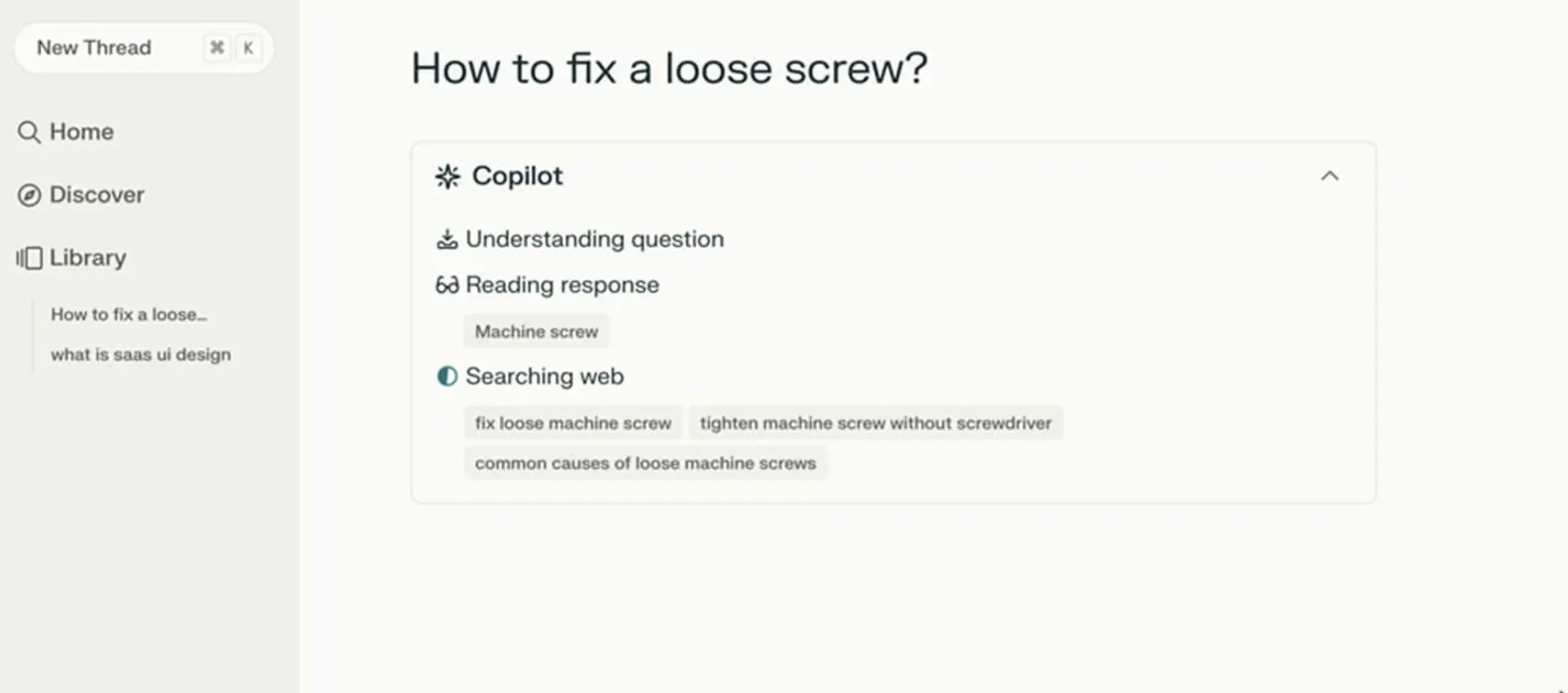
Figure 1: Perplexity AI shows users the AI’s status in real time, including what search terms it is using. (Image source: SaaSUI)
The Agentic Update Formula
To give people useful status updates, we need to connect what the system is doing with why it’s doing it. Keeping with our scheduling agent example, the system should break down the waiting period into at least four clear, separate steps.
- First, the interface displays: Checking your calendar to find open times for a recurring Thursday call with [Name(s)].
- Then it updates to: Cross-checking availability with [Name(s)] calendars.
- Next, it might display: Syncing [Name(s)] schedules to secure your meeting time on [Date and Time].
- Finally, at the conclusion, the agent confirms it has successfully completed the task and asks the user to check their email to confirm the invite that has been shared with the group.
This communication process grounds the technical process in the user’s actual life.
Making an AI’s progress easy to understand boils down to a three-part structure: a strong Action Word, what the AI is working on (the Specific Item), and any Limits or rules it has to follow.
Consider an AI helping you book a trip. A weak, unhelpful update would just say: Searching for flights…
A much better update uses the formula:
- Action Word: Scanning
- Specific Item: the prices on Lufthansa and United
- Limits/Rules: to find anything under $600.
This approach clearly shows the user that the AI understood their request and is working within the defined boundaries.
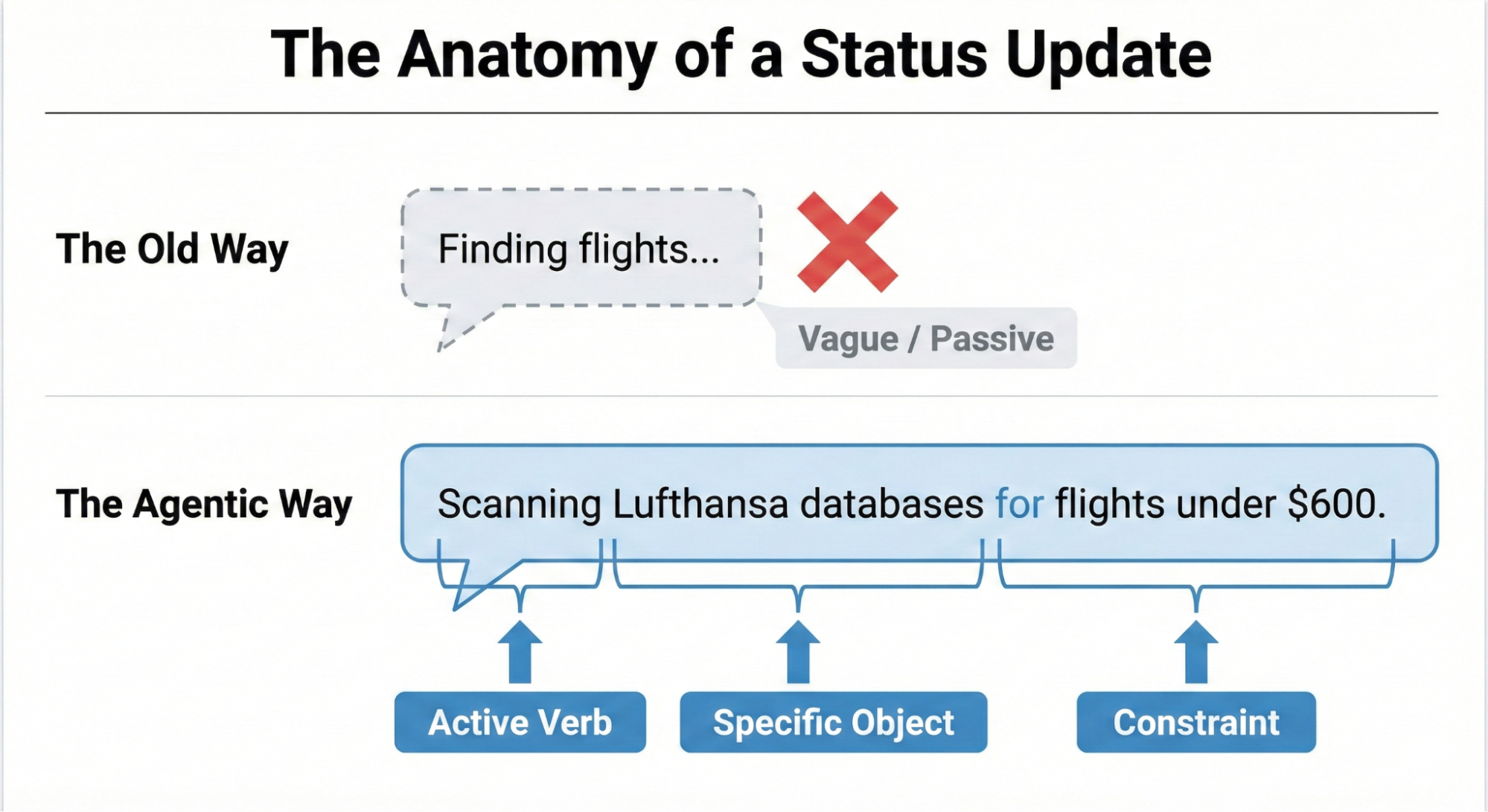
Figure 2: The Anatomy of an Agentic AI Status Update.
Matching Tone to the Risk Matrix
Should an AI sound like a person or act like a machine? The right answer depends on the task’s importance, which we can determine using the Impact/Risk Matrix from the Decision Node Audit.
For simple, low-risk tasks, a friendly, conversational tone works best. A scheduling assistant can say it’s checking your calendar for the best time — this creates a comfortable, easygoing experience for the user.
However, high-stakes tasks demand clear, mechanical accuracy. If the AI is managing a large financial transfer or a complicated database migration, users don’t want a playful interface; they want precision. A screen that says “I am thinking hard about your money” would likely cause panic. Instead, the interface should use straightforward language like “Verifying account routing numbers.” By adjusting the AI’s tone to match the level of risk, we give users exactly the experience they need in that moment.
While the Impact/Risk Matrix provides a necessary starting point, the ultimate determinant of the appropriate AI voice and tone is rigorous user research. No set of rules can predict the exact words or tone that will build trust or cause stress for every group of users in every situation. That’s why hands-on research is essential:
- Run A/B tests on different ways the AI communicates with users.
- Conduct usability studies to observe how users react emotionally to the system’s messages.
- Perform interviews to understand what users expect from an AI in terms of openness and transparency.
This kind of research ensures the AI’s tone is comfortable and appropriate for the actual people using the system in their specific context.
We’ve now covered the “what” — the critical microcopy, the clear action words, and the necessary limits that make an AI status update honest and informative. But words alone aren’t enough. A perfect sentence hidden in a poorly designed interface is still a failure of transparency. The next challenge is designing the visual containers that carry these updates — determining how progress panels, confidence indicators, and step-by-step breakdowns should be structured so that transparency is not just written, but seen.